The Adventurers Controls and Interface
Keyboard and mouse first. Hex combat is click-targeted. Extra travel keys live in Settings.
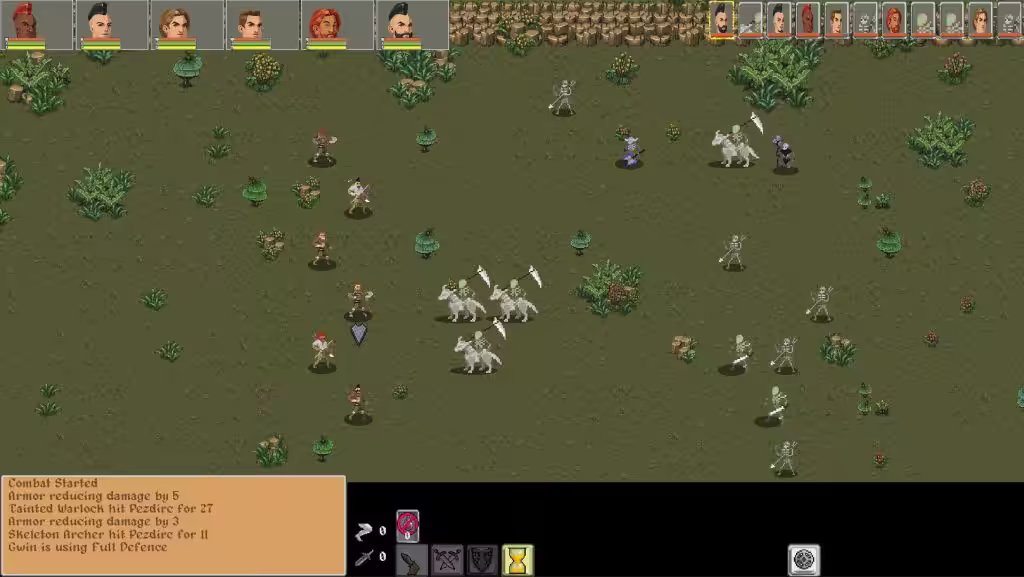
The Adventurers is built for keyboard and mouse on Windows. Combat is turn-based on a hex grid: you click a unit, click a hex or a target, and spend energy. The overworld is a travel map where walking and running are different risk profiles. Camp, tavern, blacksmith, and Town Hall are screen-based menus on the same day clock.
This page does not print a full WASD-and-Space table. The developer added hotkey customization after a community request (marked answered in 2025). Bindings can differ by save and by Steam Deck layout. If a wiki lists “Space ends turn” as gospel, treat it as folklore until you see it in Settings on your 1.0 build.
Settings is the source of truth
Open Settings from the pause menu. Look for:
- Hotkeys / keybinds — remap combat, menus, and camera if your layout offers those rows.
- Travel map — version 9.7.3 added stop-movement and center hotkeys here. Those two are verified in the live patch notes. Use stop-movement when a wagon or party is sliding toward a night fight you did not want. Use center when the camera has drifted off the company on a large Shion map.
- Town labels and other UI toggles that landed in the 9.7.x pass.
If a control is missing, it is probably still a mouse action, not an unbound key. Do not assume console-style face-button maps on PC.
Hex combat: click targeting
Battles drop you onto a hex field. The loop is:
- Select an adventurer (click the token or the portrait in the party bar).
- Inspect movement range and action range. Energy is the limiter: Resolve grants 10 energy per point; Vitality above 10 improves energy recovered each round.
- Click a destination hex to move, or click an enemy to fire the selected action (Wide Swing, Pin, Fireball, Mend Wounds, and so on).
- Bonus actions and full actions are labeled in tooltips (that distinction was called out when Druid and Warlock shipped in 8.4.5).
- End the unit’s turn when energy is gone or you want to save it for a reaction you actually have — this game is not a hidden-interrupt MMO.
Camera: edge pan and WASD pan exist; a 2024 patch added weight so the camera accelerates at the screen edge. Zoom with the wheel if your build exposes it. Fog of war (9.7.4) hides units in caves and at night until they are close; clicking empty darkness does nothing useful.
Terrain is not cosmetic. Unstable platforms (mud, sand, snow) apply a 33% hit and damage cut (9.7.3). Difficult terrain and flying exceptions (9.7.7: 20+ flying creatures ignore difficult terrain) change where you click, not which key you press.
Overworld: walk, run, stop
On the travel map you move the company between Prycoast, forts, caves, and event nodes.
- Walking is the default. It conserves supplies and is the safe way to make a contract timer if the distance fits.
- Running covers ground faster, burns supplies, and is the setting that community guides associate with night fights. If a contract is already late, running is a gamble, not a skill check.
- Stop-movement (9.7.3, Settings) is how you abort a path when an event popup, crisis choice, or nightfall is about to fire. Rest manager was also patched to stop movement rather than letting the party keep walking through a rest.
- Center (9.7.3, Settings) snaps the map back to the party.
Clicking a discovered town or node still pathfinds. Wagons were patched so they do not keep traveling while menus are open. If the company is sliding with a menu up, you are on a pre-fix save — update to 1.0.
Read travel and world for supplies, fog, and forts. This page only tells you how to steer.
Camp, town, and party bar
Camp is a task board, not a skip button. Assign cook, hunt, guard, maintain equipment, and socialize. Personalities like and dislike those chores (see the party planner). Short rest versus long rest changes how often socialize ticks. Time in camp and town was sped up in an early patch (~4×), so you are not watching a full real-time night.
Town screens — Town Hall contracts, general goods, blacksmith, enchanter, tavern sleep, barbershop portraits — are click UI. Item comparison in 9.7.x uses the currently selected party member at the top of the screen; click the portrait you mean before you hover a sword.
The party bar along the interface shows the active roster (commonly six portraits in community writes; confirm in your build). Clicking a portrait is how you target inventory and comparison, not a hidden hotkey requirement.
Steam Deck Playable
Valve certified The Adventurers Playable on Steam Deck. That badge means the Windows build runs through Proton on Deck hardware with known limitations, not that a native Linux binary exists. There is no official Mac or Linux client.
On Deck:
- Use the official Playable layout as a starting point, then open in-game Settings and bind travel stop/center if they are empty.
- Trackpads replace mouse hover for tooltips and hex picking. Combat is still click targeting, not analog aiming.
- Do not expect a verified 800×1280 touch UI. If a control is awkward, it is a Playable title, not a Deck Verified one.
This wiki will not invent battery-hour claims. If the 800 MB OpenGL game feels light, that matches the store’s storage line, not a review site.
What we will not invent
No complete keybind appendix. No dual-stick “ability radial.” No gyro aiming. No unlisted console port. If you need a bind, look in Settings, then ask on the Steam forum with a screenshot of the Settings page. Pair this reference with getting started for the first hour and combat for energy math.
Frequently Asked Questions
Quick answers about The Adventurers tactical RPG.
What are the default hotkeys?
This wiki does not publish an unverified full table. Hotkeys are customizable. Version 9.7.3 added travel-map stop-movement and center keys in Settings. Check that screen on your 1.0 build.
How does combat targeting work?
Hex combat is mouse-driven. Click a party member, then click a hex to move or an enemy to use the selected action. Energy is spent per the tooltip’s bonus versus full action label.
How do I stop on the overworld?
Bind and use the travel-map stop-movement key added in 9.7.3 (Settings). Rest and open menus should also halt wagons after those patches.
Does The Adventurers support Steam Deck?
Valve marks it Playable. Keyboard and mouse remain the design. Proton is why Deck can run the Windows OpenGL build. There is no official Mac or Linux version.
How do I open inventory or camp?
Use the on-screen icons and any binds you set in Settings. Camp is a task list (cook, hunt, guard, repair, socialize). Town screens are click UI tied to the selected portrait.
Is there controller support?
Hotkey customization exists. Steam Deck is Playable via Proton. The developer listed controller investigations on older roadmaps. Do not assume a fully mapped console scheme on PC.